
NexoFlow started as a tool for planning and publishing content, and it was good at that. But a tool still leaves the work to you, and SEO is work that never really stops. Pages break. Searches shift. Competitors post. Reviews come in. Google changes what it shows.
So we rebuilt NexoFlow as a team. With NexoFlow v2 you hire an AI SEO team for each website. You connect your accounts, tell the team about your business, and approve the changes that matter. The team does the rest: it checks your site and fixes what is broken, writes the pages and posts your customers are searching for, looks after your Google Business Profile, and tells you plainly what it did.
This post walks through everything that is new in v2. It covers Chat, the loop that keeps working while you are away, and opportunity cards and the topical map. Then site checks and fixes, the new NexoFlow WordPress plugin, and code changes for sites on GitHub. Then content, Google Business Profile and the local ranking map, reporting, and the controls that keep you in charge. It ends with the Content API and SDK for developers.
NexoFlow v2 at a glance
- Chat. One conversation with your SEO Manager. Ask in your own words. It answers from your real data and does the work.
- A team that keeps working. About every hour, the team reads your site and your search data. It decides what is worth doing, then does it or asks you, and it measures what changed.
- Opportunity cards and a topical map. Every piece of work shows its impact and effort, the page it touches, and the numbers behind it.
- Site checks that end in fixes. Problems are found, explained and fixed. A fix only counts as done once the live site shows it.
- The NexoFlow WordPress plugin 2.0. Chat can now change your pages, header, footer and menu. It can build pages with Elementor, place your photos and fix how your pages show in search. Every change comes with an approval card and an undo.
- Code changes for sites on GitHub. The team edits your site's code and shows the change running live beside Chat. It checks the result on a computer and a phone, then opens a pull request.
- Content that reads like an agency wrote it. Around 2,000 words in about a minute, planned from your search data, fact-checked, with your own photos first.
- Google Business Profile and local search. Reviews, updates, hours, services, several locations, listing performance, and a local ranking map with your competitors beside you.
- Reporting you can check. Search performance, rank tracking, what AI assistants say about you, a weekly win, before-and-after proof and a monthly report, built only from data that was really measured.
- You stay in charge. Approvals, Autopilot settings, a team budget, a pause button and undo.
- For developers. The Content API and nexoflow-sdk 0.5.0, with structured data and llms.txt for sites built from code.
From a tool to a team
The idea behind v2 is simple: you should not have to run your SEO. You should be able to hire it.
Three things stay yours:
- Connect. Your website, Google Search Console and Google Business Profile, plus WordPress, GitHub or your social accounts where you have them.
- Describe. What you do, where you work, who your customers are, and what you want most: more calls, more visitors from Google, more reviews, or a stronger spot on Google Maps.
- Approve. Anything that changes your Google listing, a live page, or anything else you would want to see first comes to you as a card with Approve and Skip.
Everything else is the team's job. And when the team cannot finish something safely, it never fails quietly. It steps down instead. Work that should not run on its own comes to you for an OK. Work that cannot be done automatically gets a plain explanation in Chat of exactly what is needed.
Chat: talk to your SEO team
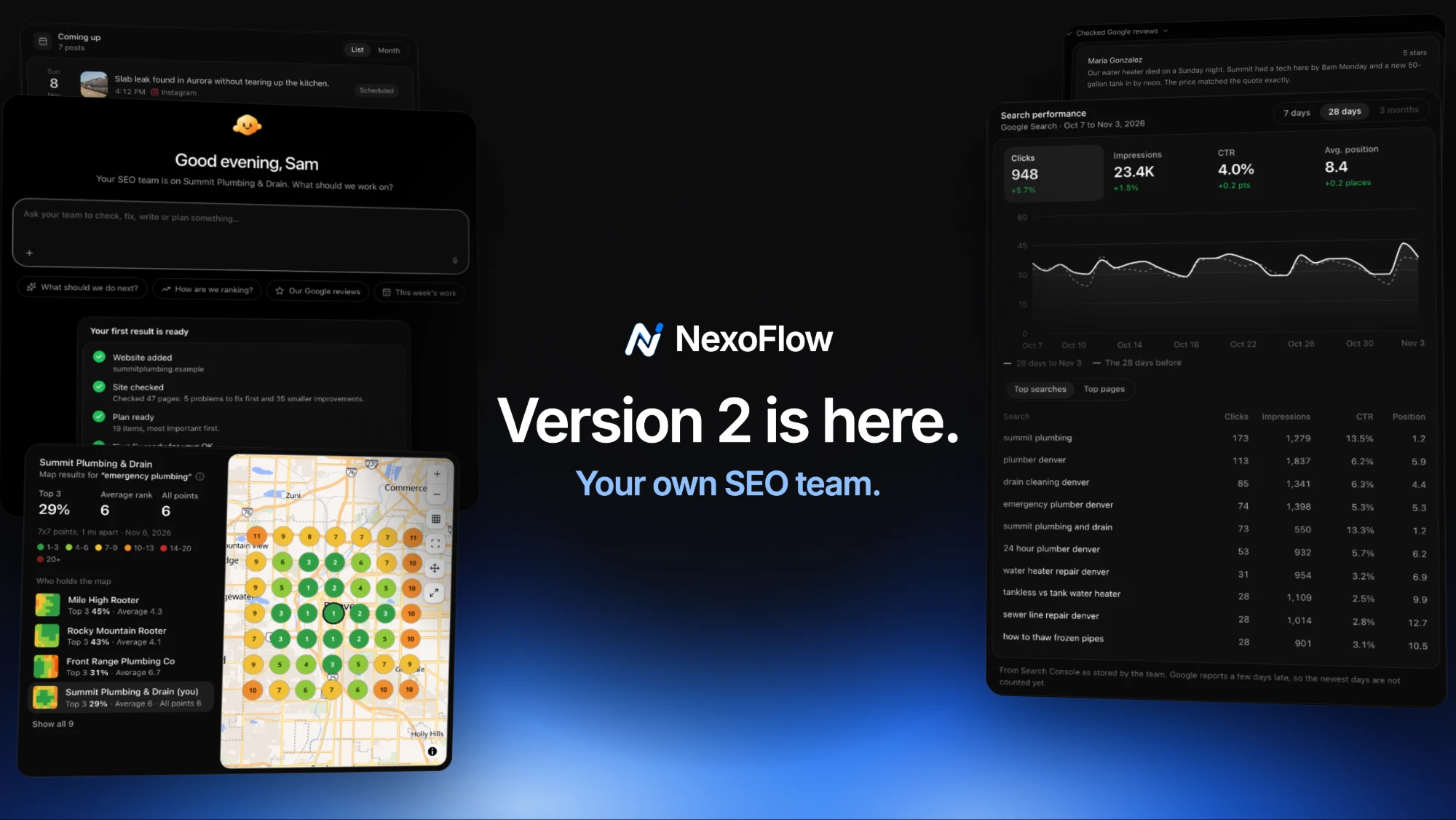
Chat is where you work with NexoFlow. It opens with a greeting, the message box in the middle of the page, and a few quick asks under it: What should we do next?, How are we ranking?, Our Google reviews and This week's work.
You talk to your SEO Manager. Behind it, the team reads your data, makes the changes and reports back. Replies are briefings, not data dumps: short sections, the numbers that matter, and a next step.
Ask in your own words
Chat reads your whole message before it does anything. "Add a recent jobs section to the homepage with our two latest jobs" is a change to your homepage. "How did the frozen pipes post do?" is a question, and it gets answered, not carried out. When you ask for a clear change, the team makes it. You do not get a menu of options back.
Answers from your data, never made up
Every number in Chat comes from a source: your Search Console data, your Google listing, your site check or your posts. Chat never invents traffic, rankings, leads, review text or results. When a source is not connected yet, or has not been read, Chat says so instead of showing a zero.
Cards you can act on
Many answers come with a card you can read and use:
- the site check as one panel of every problem, filtered by severity, with why it matters, the fix and the pages it affects;
- your search performance as a chart over 7 days, 28 days or 3 months, next to the period before;
- your Google listing's views, calls, website clicks and direction requests;
- the local ranking map;
- the calendar of everything going out;
- a plan of posts drawn as a board, with a card for every post;
- opportunity cards, each with a Start button;
- approval cards that say exactly what will change, with Approve, Skip and Preview.
Chat learns how you like to be answered
Chat answers each person their way. An owner who types two quick words gets two plain sentences back. An SEO professional gets the numbers in the trade's own words. Write in Spanish and you are answered in Spanish.
You can also just say it: "shorter answers", "talk to me simpler", "answer in Albanian". Chat keeps that from then on. Ask "what have you learned about me?" to see what it keeps, or tell it to forget.
It is per person, so two people working on the same business each get their own answers. The product's rules always come first: no invented numbers, and no skipped approvals, however someone asks.
The small things that add up
- Undo. "Undo that" takes back the change Chat just told you about: a page section, a Google listing change, a post edit or a code change.
- Edits in your words. A small change to a post, in your own words, is made in place, kept for undo, and live with a link.
- Your photos. Attach a photo and ask for a post, and the post uses your photo, not one made up for it.
- Tidying up. Delete a post, or take something off the calendar, straight from Chat.
- Nothing lost. A reply keeps writing if you refresh the page, close the tab or lose your connection.
- The budget. Ask what the team has spent, what is left, and what a piece of work costs.
Your first day
When you sign up, NexoFlow reads your website: your services, the towns you work in, and your phone number the way people write it. It runs a free site check and shows you what your team found before you choose a plan.
While you sign up, you also see where you show on Google Maps today. NexoFlow maps the search for what you sell around your business: a 7x7 grid of points, your rank at each one, the share of points where you are in the top three, and the three businesses that hold the most of the map, by name. If the Google listing it finds does not give your website as its own, it asks "Is this your business?" first. The day you pay, that map is waiting in Chat as your business's first map, with every business on it named.
Adding another business later, from Chat, works the same way: the team shows what it found on the new site, and makes its first map right after you start it.
Once you have paid, the team starts on its own:
- Autopilot starts in "ask me first". The team works, and changes wait for your OK.
- The first site check starts at once, unless the check from signup already did the job.
- On a site whose code is on GitHub, the first change gathers every fix the code can make.
- Chat opens on a first conversation with your team, instead of a checklist. It asks one question at a time: your services; what you do and who your customers are (read from your site, for you to confirm); your towns, phone and hours; and what you want most. Then it tells you what the site check found and what goes first, and asks only for the connections that are still missing. You can skip any question.
For your first two weeks, Chat's home shows a day-one card: website added, site checked, plan ready, first fix ready for your OK. After two weeks, a short report in Chat says what the team has done so far.
The team keeps working while you are away
The heart of v2 is a loop that runs for every business with an SEO team. About every hour, the team checks in on your site and goes through six steps.
- Observe. It reads your latest site check and your Search Console data (the last 28 days against the 28 before). It also reads your posts and pages, keyword research, the questions people ask on Google, your internal links, your Google listing and its photos, and your sitemap. It checks whether AI assistants are allowed to read your site, what they answered about you last month, and how the work it already shipped turned out.
- Analyze. It turns what it found into opportunity cards, and each card quotes its numbers.
- Decide. It follows your Autopilot settings and the risk of each piece of work.
- Execute. It does the work, asks for your OK, or tells you what is needed.
- Measure. It compares the 14 days after a change shipped with the 14 days before, once Search Console has caught up.
- Learn. What worked feeds the next plan.
A few rules keep this honest:
- Fresh evidence only. Old site-check findings, or Search Console data more than a week behind, never start new work.
- One change per page at a time. Site-check fixes come first, then how the page shows in search, then content that is slipping, then searches close to page one.
- No pile of questions. At most five questions wait for you at once, plus two about your Google listing.
- Results measured against the rest of your site. A page only counts as a gain if it did better than the rest of your site over the same days. Chat shows you the numbers and never claims the work caused them.
- Busy is not broken. When the team is at capacity, work waits its turn and comes back. It does not turn into a problem for you.
- You can pause it. Tell Chat to pause the team and it stops. Connecting a new account will not restart a team you paused.
Opportunity cards and the topical map
Every piece of work the team plans is an opportunity card. A card tells you:
- what to do, in plain words: Move "plumber denver" into the top three, or /specials shows a "page not found" error;
- the page it touches;
- its impact, the team's confidence and the effort;
- the evidence, with the numbers;
- why the team judged it the way it did.
Cards come from many places:
- problems the site check found;
- key pages Google leaves out of search;
- searches where you sit in positions 5 to 20;
- pages that get fewer clicks than their position should bring;
- content that is slipping;
- two of your pages competing for the same search (you choose which to keep);
- questions people ask that your site does not answer;
- internal links;
- a weekly Google Business update, and fresh listing photos;
- structured data;
- whether AI assistants are allowed to read your site.
The team judges each card the way an experienced SEO would. It asks what the search is worth to you, and whether your site can realistically win it. In your first two weeks, it also asks how soon the work will show. It never promises a ranking or a date.
The topical map
The topical map is how the team plans your site's content. Each pillar is one of your services, shown with its main page, or marked when the page does not exist yet. Under each pillar sit the cluster topics: the questions and searches around that service, with a page or still waiting for one.
The map stays sensible:
- A catch-all category does not become a pillar. Neither does a category copied from your listing that nothing else backs up.
- "Hire" searches, the ones with best, affordable, near me or contractor in them, belong to the service's main page, not to a page of their own.
- A search that names another business is never treated as a page for yours, and the writer never names one.
No duplicates, no thin pages
Before a new page or post is planned or written, it is checked against every post and page you already have, by its words and by its meaning.
A new page only publishes on its own when three things are true. It is deep enough: a service page needs at least 650 words and three sections, a local page 550 words, a guide 700. It is not a near-copy of another page. And it does not compete with a page you already have. Anything that fails waits for your OK.
Site checks, and the fixes the team ships
The site check reads your site page by page, looking for:
- missing or weak titles, descriptions and main headings;
- broken links and images, missing pages and error pages;
- redirects, including old addresses that redirect but are still linked from your pages;
- thin or duplicate content;
- heavy and slow pages;
- canonical tags, and pages blocked from search;
- structured data, sharing tags, image descriptions, mobile and language.
In Chat, the result is one panel: the totals, a severity filter, and one row per problem that opens to why it matters, the fix and the pages. You can ask about one page ("what's wrong with the contact page?") or ask for the full list. You can download it as a spreadsheet or a printable report.
Things that are not pages, like feeds, sitemaps and admin addresses, are kept out of the counts, so the numbers mean something. An address that redirects is not counted as a page with problems.
The team runs a new check every two weeks. Fixes ship the way your site is built:
- On WordPress, through the NexoFlow plugin (more on that below).
- On a site built from code, as a code change on GitHub.
- On posts NexoFlow wrote, in the post itself.
A page that is gone gets a permanent redirect to the page on its topic. A fix only counts as done once it is confirmed: the change is live, and the next check no longer finds the problem.
The NexoFlow WordPress plugin
The biggest addition for WordPress sites is the new NexoFlow plugin. It started as the way NexoFlow publishes posts to WordPress. With version 2.0 it lets your team work on the whole site.
Connect in a minute
Ask Chat to connect WordPress and you get a card with your site connect key and three steps:
- Download the plugin and upload it under Plugins, Add New, Upload Plugin.
- Paste the key in the plugin's settings.
- Choose Test connection.
The card turns green as soon as the plugin connects. No password ever goes into Chat. If you would rather use a WordPress application password, the card has a form for that too. The plugin comes first because many hosts block application passwords.
Publishing
The plugin creates and updates your posts: title, content, excerpt, categories, tags, featured image and schedule, in your site's time zone. If you use Yoast or Rank Math, it writes the search title, description, focus keyword and canonical into their fields. It checks in with NexoFlow about once a minute, and a post can also be sent straight away.
It is careful with what is already on your site. A NexoFlow draft that never went live will not take over or overwrite a live post that happens to share its address. Small edits to a live post go to WordPress in place, with an undo.
Change your pages from Chat
This is the new part. With the plugin connected, Chat can read your site and change it. It can:
- add a section to the homepage or any page, built like the page's own sections;
- change one section and leave every other section as it is;
- rebuild or redesign a page in one change;
- on block themes, change the shared header and footer, for example to add a link to the menu;
- create a new page;
- add an image to your media library and place it on a page.
Chat reads the page first. Then it proposes the change on an approval card that describes it in words: what the new section says, which photos it uses and where it goes. You never get a wall of code in the conversation.
A change to the homepage, a published page, the header or the footer goes live when you approve it. The version from before is kept as a restore point, so "undo that" puts it back. New pages are saved as drafts. If your site does not keep page revisions, the plugin leaves published pages alone.
Elementor pages
The plugin also works with Elementor 4.3 or newer when Elementor's MCP setting is switched on. The plugin's settings page has a button that switches it on for you. On those sites, the team builds and rebuilds pages with Elementor itself.
A new page is a draft. A change to a published page is held back by Elementor until it is published. Publishing a page, or making it your homepage, comes on its own approval card, and the earlier homepage can always be put back. If Elementor is not ready on your site, Chat tells you why, in your site's own words.
Your photos, and placeholders where there are none
A page the team builds or redesigns gets photos. It uses your own wherever one fits: the photos already on the page, one you attach in Chat, or your NexoFlow photo library (and, on an Elementor site, your site's media library).
Where there is no photo yet, it places a plain placeholder of the right shape: wide, landscape, square or portrait. Chat then lists every spot still waiting, what kind of photo belongs there and the size that fits, and asks you for them. A placeholder is never presented as your photo.
Search fixes from the site check
Plugin 2.0 lets the team fix what the site check finds, right on your pages:
- each page's search title and description, its canonical address, and whether search engines may show it. No SEO plugin is needed. If you have one, NexoFlow writes into its fields;
- link previews for social and messaging apps, with the page's own picture;
- exactly one main heading per page, looking the same as before;
- author, date, tag or category archives kept out of search and the sitemap;
- redirects from addresses that no longer exist (a page that exists is never redirected);
- descriptions for images that have none;
- a missing phone viewport, language or page title;
- moving a page to the Trash and bringing it back. Nothing is deleted for good, and the plugin refuses to move your homepage, blog page, privacy page or a page with pages under it;
- a plain page cache, only if you ask for it.
The fixes come to you on one card, with one undo.
Structured data, llms.txt and change notices
The plugin also keeps three things up to date for you.
- Structured data. Each page carries the markup that tells search engines who your business is, where you work and what you offer. It is built from your records in NexoFlow, and only markup that passes its checks is published.
- llms.txt. Your site answers /llms.txt with a short file that tells AI assistants what your business is and where its key pages are. If you already have your own llms.txt, yours stays.
- Change notices. When NexoFlow publishes or changes a page, search engines (Bing among them) are told to read it again.
Built to be safe on your site
- The plugin runs a small, fixed set of actions. There is no way to run code, database queries or file operations through it.
- Every action runs as a WordPress account on your site and follows that account's permissions.
- Every request is recorded. The plugin's settings page lists what NexoFlow did on your site, and why anything did not go through.
- An administrator can switch page work off on the settings page. Publishing keeps working.
- The plugin has no AI settings and never contacts an AI provider. All the AI work happens in NexoFlow.
- It does not track your visitors.
Setting it up step by step is in the help centre: Connecting your website.
Sites built from code: changes on GitHub
If your site's code is on GitHub, connect the repository and the team works in the code itself.
Ask for anything in your own words: a new page, a new section, a menu fix, a form, a change of style, or every fix the site check found. In Chat's site panel you can also point at something on your site and ask to change only that.
While the change is being made, your site runs live beside Chat and every save shows up. Before the change is called ready:
- your site's own build has to pass;
- the built pages are read to confirm each fix is really there. If none of them is, nothing is pushed and nothing is charged;
- new pages are checked for depth, near-copies, title, description, heading and links, and revised once;
- pages are opened the way a visitor sees them, on a computer and on a phone, and anything out of place goes back for one more pass.
One request is one pull request, and corrections land on that same pull request. Not what you pictured for a new page? Say "fix it", "try again" or "rename it to Concrete Maintenance", and the team redoes that page as a new change in place of the one before. Ask for a page about something else and it is its own request, and the first page stays as it was.
Site fixes, and new pages that pass every check, go live on their own. Anything else you asked for waits until you say so, on a card in Chat.
After a change goes live, the team watches your site until the change shows up. If your host did not publish it, the team asks the host to publish again or starts a fix for the build. Any published change can be undone from Chat.
Code changes are paid from your credit. You are charged only when something is delivered, and never twice for the same work. More in the help centre: Code changes on GitHub.
Content that reads like an agency wrote it
The writer is rebuilt for v2. A full post of around 2,000 words takes about a minute, and every post is:
- planned from your business's facts, your Search Console searches, the questions people ask and everything already on your site;
- fact-checked in a second pass, with prices only from published sources and every link checked live;
- held back if it is cut off, much shorter than planned, or quotes a price without a source;
- written so each fact is said once, and every FAQ answer adds something new.
Ask Chat to plan a week or a month of posts and the plan is drawn as a board while the reply is still being written: a calendar, and a card for every post with its channel and its picture. A card shows your own photo when the plan picked one from your library, or says what is still needed, like a photo to add. The board is a proposal, topics only. One button creates the plan as shown, and writing, scheduling and publishing then follow your usual approvals.
Pictures follow a picture guide made for your business, and a fitting photo from your own library is used before a generated one. Only what is on your calendar goes out. A draft you move stays a draft. A temporary failure is retried, and nothing is sent twice.
See how the writer plans and checks a post: Content Writer.
Google Business Profile and local search
Your listing
Connect your Google Business Profile and the team will:
- read your reviews, draft replies in your voice, and post a reply only when you say so;
- write Google updates (two to four short paragraphs, one call to action, your attached photo as the picture), and change or remove one after it has gone out;
- update your hours when you give them, on a card you approve;
- propose services with their descriptions, your business description, extra categories and attributes, each on a card you approve word for word, and each one undoable;
- compare your listing with the ones Google shows first as soon as you connect it, and propose up to three improvements;
- suggest a fresh update for each location every week, and fresh photos from your library when your listing's photos get old.
Some things the team never changes, whoever asks: your business name, address, phone number, website and main category. Every change to your listing waits for your OK. Changes go out at least two hours apart, at most three a day, and only to verified listings.
Have several locations? Connect as many as your plan covers. Each one gets its own updates, its own review replies and its own numbers.
Ask "how is my Google listing doing?" and Chat shows your views, calls, website clicks and direction requests over 7 days, 28 days or 3 months, next to the period before. More on Google Business Profile and reviews.
The local ranking map
Where you show up on Google Maps depends on where the person searching is standing. The local ranking map shows it. You see a grid of points around your business: 4x4, 7x7, 9x9 or 13x13, half a mile or a mile apart. Each point shows your rank there. The map also gives the share of points where you are in the top three, and who holds the map.
The team maps your main searches every month. Two maps a month are included, and you can run more from credit after Chat shows you the price. A map that fails is never charged.
Next to the map, Chat puts you and up to five of your main competitors side by side, from their listings, reviews, posts and pages. Each gap becomes work for the team. The team never contacts other businesses or websites for you.
Social posts, the calendar and your photo library
- Social posts. With social posting on your plan, the team writes and publishes posts for Instagram, Facebook, X, TikTok, LinkedIn and Pinterest. You set how often each channel posts.
- One calendar. Website posts, social posts and Google updates on one calendar, in your business's time zone, with live links once they are out.
- Your library. Every photo and video in one place: your uploads, Chat attachments, and imports from your website and your Google listing. Each one is marked with where it came from and whether it has been used. You can post your own photo or video, with your own words, to any channel from Chat.
Reporting you can trust
Everything the team reports was really measured. A source that is not connected, or could not be read, is never shown as zero. A week with nothing in it is simply left out.
- Search performance. Clicks, impressions, click-through rate and average position, with your top searches and pages. Position is weighted by impressions, the way Search Console counts it.
- Rank tracking. Up to 20 of the searches the team is working on, checked every day, with the change against a week before. See the rank tracker.
- What AI assistants say about you. More people now ask an AI assistant who to call instead of searching. About once a month, the team asks ChatGPT, Claude, Gemini and Perplexity the questions your customers would, one per service, in your town: "Who do you recommend for water heater repair in Denver, CO?". It writes down whether you were named, whether your own site was one of the sources, and which other sites were cited instead. Ask Chat "does ChatGPT recommend us?" to get the latest round, with what each assistant said. The questions stay the same from month to month, so the trend means something, and a round that came back with too few answers is never shown.
- Weekly win. On Chat's home: the week's work (posts, fixes, review replies, listing updates), your search visits against the week before, and the calls and visits from your Google listing.
- Before and after. Everything since the team started: search clicks, impressions and position; your searches grouped by where they rank and how many moved; your listing's numbers; your first site check against the latest; how often AI assistants named you; and all the work shipped. Each side is compared only when both are complete. You can share it with a private link that you can switch off at any time, and search engines never index it.
- The monthly report. Early each month, Chat brings you last month's report on a private page, laid out like the report an agency would hand you, with a chapter on what AI assistants said about you once a full round is in.
- Emails. A daily update, a weekly message and budget notices, plus an email when your whole site's search traffic drops or something waits for your OK. Every email tells you how to switch it off, and the team's updates stop with one click.
More on SEO reporting.
You stay in charge
An autonomous team only works if you can trust it. These are the controls.
- Approvals. One place for everything waiting on you. Each item shows exactly what it changes, before and after, and whether it is low, medium or high risk.
- Autopilot. Choose conservative or aggressive, "ask me first" or "go ahead", which topics come first, and how many posts a week. Low-risk work runs on its own. In conservative "ask me first", medium- and high-risk work waits for you. New businesses start there. See Autopilot.
- Things that always wait for you. Every change to your Google listing, and which of two competing pages to keep, wait for you on every setting.
- The team's budget. Ask Chat what the team has spent and what is left, and set how much of your monthly credit the team may use on its own.
- Pause. One message pauses the team, and it stays paused until you say so.
- Nobody contacted as you. No part of the team emails, messages or calls anyone on your behalf. There is no tool for it.
- Undo. Changes to your pages, your Google listing, your posts and your code can be taken back from Chat.
For developers: the Content API and nexoflow-sdk 0.5.0
If your site is built from code, it can read everything your team writes through the NexoFlow Content API. The quickest way in is the TypeScript SDK, nexoflow-sdk. Version 0.5.0 is a big step for it.
npm install nexoflow-sdkimport { NexoFlow } from "nexoflow-sdk"
const nf = new NexoFlow({ apiKey: process.env.NEXOFLOW_API_KEY! })
const { data } = await nf.posts.list({ limit: 10 }) // a page of posts
const { data: post } = await nf.posts.get("my-post") // one post, with its HTMLUse the SDK from server code only. Your site key is a secret.
What is new in 0.5.0:
- The Next.js cache works. Every request carries your
revalidatetime, so pages are served from the Next.js data cache and the API is asked again at most once per window. - Cache tags. Every request is tagged (
cacheTags.posts,cacheTags.post(slug)and more), so a route of your own can refresh exactly what changed. - Faster full reads.
all()andslugs()read four pages at a time, anditer()reads the next page ahead. - Retries and cancels that behave. The timeout is per attempt. A cancel is one call, never retried. A hook that throws fails the call once, with its own error.
- Structured data for every page.
structuredData.forPath(path)returns the JSON-LD a page should carry, built from what NexoFlow knows about the business.jsonLdTextescapes it so it is safe to print. - llms.txt in one line.
llmsTxt.handler()is a ready route for/llms.txt. - Shared calls where you need them. The
dedupeoption lets identical requests made at the same moment share one call, for runtimes like Express, Fastify or Workers.
// Print each page's structured data
import { jsonLdText } from "nexoflow-sdk"

export async function PageSchema({ path }: { path: string }) {
  const { data } = await nf.structuredData.forPath(path)
  if (!data.jsonld) return null
  return <script type="application/ld+json" dangerouslySetInnerHTML={{ __html: jsonLdText(data.jsonld) }} />
}
// app/llms.txt/route.ts
export const GET = nf.llmsTxt.handler()The Content API itself got better in v2 too. Every post is served with an author and a real category, its image's true size, tables that read well on any site, and links written in your site's own form. The SDK has no dependencies and runs in Next.js, Nuxt, SvelteKit, Astro, Remix, Express, Fastify, Cloudflare Workers, Deno and Bun.
The full reference is in the SDK docs and on the developers page.
Questions people ask
Is NexoFlow v2 a tool or a service?
Neither, exactly. It is an AI SEO team. You do not log in to do the work yourself, and you do not wait on an agency's schedule. You talk to your SEO Manager in Chat, and the team does the work, asks you before anything big, and shows you what it did.
Do I need WordPress?
No. On WordPress, the NexoFlow plugin lets the team publish and change your pages. If your site's code is on GitHub, the team makes code changes and opens pull requests. Sites built from code can also read your posts and structured data through the Content API and the SDK.
Will the team change my site without asking?
Not at first. New businesses start in "ask me first", so changes wait for your OK. Low-risk work runs on its own. Page changes on WordPress come on an approval card. Changes to your Google listing always wait for you. On a site built from code, site fixes and new pages go live once every check passes. Anything else you asked for waits until you say so. Every change can be undone.
Does NexoFlow promise rankings?
No. Nobody honest can. The team judges each piece of work by what it is worth and how likely it is to pay off, and it measures what happened afterwards. It shows you the numbers without claiming the work caused them.
What should I connect first?
Your website and Google Search Console, so the team can see how you show up in search. Then your Google Business Profile if you serve customers locally, and WordPress or GitHub so the team can make changes. Chat tells you what is still missing and what each connection lets the team do.
Does NexoFlow check what ChatGPT says about my business?
Yes. About once a month the team asks ChatGPT, Claude, Gemini and Perplexity the questions your customers would ask about your services in your town. It records whether you were named, whether your site was a source, and which sites were cited instead. You see it in Chat, in the monthly report and in before-and-after, against the month before when the questions were the same.
Can I use NexoFlow for several businesses or locations?
Yes. Each business gets its own team, and you can switch between businesses in Chat. A business with several Google locations can connect as many as its plan covers, and each location gets its own updates, reviews and numbers.
Start your SEO team
NexoFlow v2 is the team we always wanted to give small businesses: one that checks, fixes, writes and reports, and asks before anything big. Connect your website, tell the team about your business, and let it get to work.